inkjet profiling
getting best performance from an inkjet printer

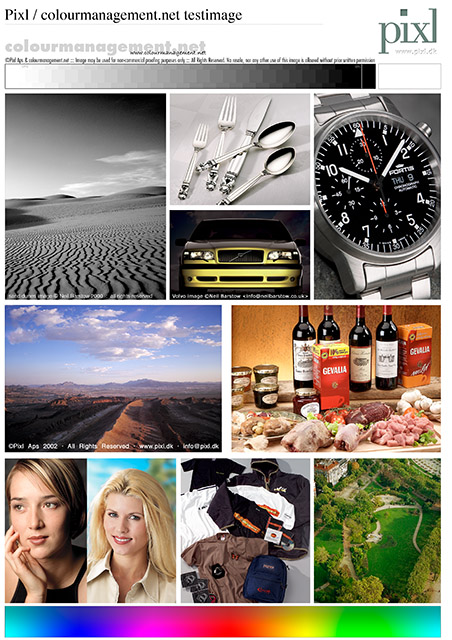 Do your prints look as good as they might? No matter how carefully devices such as display screens and printers are manufactured, there are inevitable small variations, even from the same production line. Added to this is the problem of mixing devices from different manufacturers or production lines. So each device might interpret the numbers in an image file differently and if we don't take control each device is likely to produce differing colour and tone from that intended. Because of these day to day changes in manufacture, any printer can differ from those originally tested when producing the manufacturer's generic ICC paper profiles, this means that, even with the manufacturer's own inks and papers, users who have custom profiles built can often see a significant improvements in colour fidelity and tonal range. If you use paper from other manufacturers then the improvements can be even greater.
The printer can really come into it's own with improved colour and tone when using a custom ICC profile. That means an ICC profile made for that individual machine, with the specific ink and paper used.
If the paper is manufacturer's own and is listed by name in the print driver software's "media" options then the profile making procedure is very straightforward. Read on for info about non-original consumables and their impact on printer performance and the profiling process.
You can download a good Test Image from my downloads page and use it to test your printer. I also make a kit to provide a comparison in this test.
Please click here to get in touch about printer profiling.
what I do, what I recommend
For RGB driven printers (i.e. printing straight from Photoshop or Lightroom etc. via the printer's driver software) I can provide a remote profiling service by post, this service uses techniques developed in partnership with Thomas Holm of the internationally renowned Pixl, Copenhagen. Many years of experience working on this process means I can also provide you with a detailed and concise instructions to assist you in setting up your printer to ensure optimum performance before printing out the profiling patches (Never underestimate the importance of ascertaining the correct printer settings before profiling as it can make or break your print quality).
A printer profile is made by accurately measuring a range of coloured patches on test-charts which are printed out on your own machine on the specific paper you want to use with the printer driver software settings optimised and recorded. I measure your charts using a professional automated spectrophotometer and build the profiles with high-end profiling software. Essentially, in processing the readings, a table is built which compares measured results from your printer to the numbers in the patch data which was sent to the printer - thus an icc profile is made which can calculate between the two. That table in the ICC profile now accurately describes the characteristics of your own printer, ink and paper combination and allows accuracy by a translation of each pixel in any image to be printed.
About our remote inkjet printer profilemaking
Starting back in 1999, Thomas Holm of Pixl, Denmark and I worked together to offer end-users a remote inkjet printer profiling service. We produced a detailed 17 page printer profiling manual for customers who would use it as guidance to print out our profiling charts or 'patches' themselves. Our manual was long and very detailed, so maybe not everyone fully read it because, unfortunately, even with those comprehensive instructions - the process proved to be prone to issues due to client errors. Frankly, its very easy to make a mistake when there are vital settings in dialog boxes within dialog boxes. I really prefer it when the profiling process works smoothly and successfully, I am sure you would too.
When a printer profile does not give good results it has, in my experience, always (unfortunately) been due to user error in settings during the process of patch printing.
The many options within imaging applications and in the printer manufacturer's driver software can be pretty confusing.
In addition to that, for non-original manufacturer (non-OEM) media types, there is also the matter of ascertaining optimal media settings, more on that below, to be used in the printer's driver software. When a “media” type is selected in the printer software, that setting often has a very significant effect on print appearance and, thus, on the resulting printed out patches that I will measure to make the profile. Unless we ascertain the ideal setting, the driver software can compromise the process of patch printing, and this will inevitably compromise printed image quality.
I believe I run the only profiling service that takes the trouble to assist with this when needed.
SO, given that I think users benefit from one-to-one help with the process, I now offer an 'enhanced' service to assist with patch printing.
I generally do it that via an Internet-based remote access system where we connect by computer and phone and I talk you through the process, whilst viewing your screen.
After printing, you send the printed profiling patches by post to me, I read the result to make the profile which is sent to you by email.
This one-to-one assisted process increases the cost over a basic service of course, depending on how much support time is needed.
For subsequent profiles, axtra media etc. I hope you'd be OK to print the profiling patches yourself to keep the cost down, since the process we go through together is educational as well as helpful.
Please click here to get in touch about printer profiling.
If you'd like to read more on ICC profiles please follow this link.
 Remote profiles are uniquely made here from 2 sets of printed testcharts, I like to rule out printer idiosyncrasies which can produce large differences between prints done one after the other. Thus I feel it's essential to report back if the difference is too great, in these circumstances I often produce 2 profiles so that you can test them both. If your printer is very inconsistent when measured then your prints are likely to be too, measuring a single set of charts cannot reveal this potential problem.
All this measuring and comparison takes time, of course. But experience in making hundreds of profiles has shown that it gives better results, so I think it's very worthwhile, and I have a lot of very happy customers who would agree. Please click here to read client feedback. Here I use professional level auto scanning equipment and high end software because I don't think a hand held spectrophotometer and amateur level software gives the accuracy needed, or provides the options I need to make great profiles. It seems my clients agree.
the printer profile in use
 Imagine having a Photoshop expert on call to look at every image on screen, and, using a deep knowledge of the printer's behaviour to anticipate your printed result. Then she'd quickly apply a set of very accurate curves and alterations to ensure the printer uses it's full capabilities to reproduce your image as well as it can? That seems like nirvana, an unattainable idea, but, basically, that's what the ICC profile does - in the background - instantly. It can seem like magic to those who have struggled with making manual adjustments to images to try to compensate for unexpected print results.
 When ink and paper works right, in combination with a good quality profile, it's fantastic. For the portfolio - or for client prints or for those offering prints for sale, ultimate quality will let the photographer's vision shine through.
Please click here to send an email with a few details if you'd like me to make a profile for you. There may well be some questions to answer to make sure this is done right for you and your own circumstances.
Beware, unfortunately occasional changes to Epson's software drivers and in Adobe Photoshop and to Apple's OSX - i.e. changes made in new releases, can result in a disturbance to the path taken when printing. IF you are using OSX, then please get in touch to discuss this. Please click here to email me about OSX and profilemaking, if you provide contact details & I will call or email you to discuss.
feedback about my remote (postal) printer profiling service
 A write-up from Steve Upton,
colour management guru, Chromix, Seattle USA:
The best piece of advice I can offer is to say that custom profiling is a service, NOT a product/commodity.
We've been building custom profiles for people for many years and have found that the pre and post-sales support and documentation can contribute to the success of profiling as much as equipment and technique. Now that I bring it up, equipment and technique also play a significant role. We have wanted to lower our price a number of times but find we cannot pay for the quality tech support that's required to get good profiles.
It's pretty easy to buy an i1 Photo and start building profiles. Having a longer track record experiencing the pitfalls and problems of inksets, paper types, RIPs, drivers, gray balance, operating systems, humidity, dry-down, lighting and metamerism, graphics applications, monitor calibration, and so forth can make the difference between "ok" and true professional-level results. Those who have invested in professional-level equipment will also have a longer list of variations they can apply to profile building (along with their experience level).
I'm not pushing the Chromix profiling service, in fact I would recommend that if you want someone in Europe who has a long track record of building profiles you should consider Neil Barstow's service at colourmanagement.net. There are others in Europe building profiles and I don't want to knock them, but they don't have the track record of colourmanagement.net.
Think of it in terms of hiring a person to do a job. While you can find a really cheap haircut is it the cut you want?
If you're in the UK and you need help with any of this colour stuff then Neil Barstow's the guy. Nice guy, he knows his stuff and he's not afraid to tell you what will work and what won't. Also his background is as a photographer so he speaks the language.
Steve Upton
click here to visit Steve's Chromix web–site
printer driver settings for non driver-listed papers
Very Important: When profiling a printer for a paper not listed in the printer driver software, or one using non-original inks, the user must first set the printer up correctly by selecting a paper type and other options within the driver software. These options were originally formulated very carefully to get optimum performance on the printer manufacturer's own listed papers, using their own inks.
We can have no idea what driver options to recommend users of non original papers or inks for really great imaging. (During testing I have observed that optimum driver settings can sometimes differ between even same model printers, perhaps due to different batches or factories.)
To get the best results from a profile it is essential to eventually print the profiling test charts with the printer in as near to a neutral and perfectly set up state as possible. We all want the best blacks, best gradations and colour range we can have, right? If the printed patches are merged, i.e. colour or tonal separation is non-existent, or if range is restricted, then that's just not possible.
Therefore, each user will need to discover the best settings in the printers driver software for the paper and ink to be used, if we don't do this then the profile may fail - or perhaps have to do too much work (i.e. the corrections needed become too extreme) and this can actually damage images when using the profile for printing.
So, testcharts produced on an incorrectly set-up printer often result in an unsuccessful profile. Sometimes even with a visually successful profile things might not be all as they should be - because of the amount of processing needed, there might be an increase the risk of posterisation of images - where tonal stepping like contour lines appear in areas which originally had smooth gradation. This means that every user wanting optimum performance will ideally test (by printing) every combination of usable paper choice and settings available in the printer's driver to discover which settings allow the best non profiled print - thus allowing assessment of the options and optimising the printer for the particular paper stock. Once the best printer driver options are ascertained, they must then be used for printing profiling patches and afterwards every time the profile is used to make a print.
The practical solution:
Of course I am happy to come on site and do this work for you, I often do this for busy clients who want to spend their time on profitable photography rather than complex testing. However, for those who'd like to do the testing themselves, I can provide advice on how to do that.
CMYK RIP and proofing, set-up and profiling
.jpg) Proofer set-up is done by working on site. It's very difficult to make ultimate CMYK profiles remotely because the process involves testing a multitude of settings in a step by step process. Proofing can be done to simulate many different printing press types, I can even set you up to successfully simulate an ISO standard CMYK press. I can provide equipment to allow testing of proofs and the production of a certificate to accompany each.
Proofer set-up is done by working on site. It's very difficult to make ultimate CMYK profiles remotely because the process involves testing a multitude of settings in a step by step process. Proofing can be done to simulate many different printing press types, I can even set you up to successfully simulate an ISO standard CMYK press. I can provide equipment to allow testing of proofs and the production of a certificate to accompany each.
More on proofing here.
Would you like to find out even more, or ask about services? Please click here, to send an email, please write a little about your work, how it's printed and the software and printing equipment you currently use.
This image at right is from the excellent Altona test suite, more information about Altona proofer tests here.